Open Data is Infrastructure: Building MakanMap SG
Singapore’s hawker culture was added to UNESCO’s Intangible Cultural Heritage list in 2020. There are 129 government-managed hawker centres and around 6,000 cooked-food stalls across the island. And yet, when I want to find a good plate of laksa, I still end up bouncing between Google Maps, a few Reddit threads, and a blog post from 2019.
MakanMap SG is a side project I built to see if that gap was worth closing. It covers 122 active centres, 3,360 stalls, and 14,497 Google reviews, with an AI layer on top that recommends places based on what people actually wrote about them.
Why open data changed the scope
The first surprise was how much of the groundwork had already been done for me. data.gov.sg publishes every hawker centre as a GeoJSON file, with coordinates, names, addresses, and operating status all neatly structured. LTA does the same for MRT exits. I wrote a single seed script to pull both into Postgres, and just like that, I had the skeleton of the product.
That completely changed what felt realistic for a side project. If I’d had to geocode 122 addresses by hand or scrape station locations from Wikipedia, I probably would have given up after a weekend. Instead, the project could start from a solid foundation rather than from data collection.
It made me realise that government-published datasets aren’t just a convenience. They’re infrastructure. They shift the bottleneck from “can I get the data?” to “what should I do with it?” and that makes for a very different kind of project.
Collecting the rest of the data
Stalls. I used the Google Places nearbysearch endpoint with a small radius around each centre, paging through results. The API caps you at 60 results per search, which is fine for most centres and painfully short for a few of the big ones. I also wrote a small keyword-based cuisine tagger — chicken rice maps to Chinese, nasi to Malay, prata to Indian, and so on. Final count: 3,360 stalls.
Reviews. The Places Details endpoint returns at most five reviews per place, with no way to paginate. To get more coverage, I pulled reviews at both the stall level (13,952) and the centre level (545), which gave me 14,497 reviews in total.
Embeddings. For each review, I prefixed the text with its centre name, address, and nearest MRT station before sending it to OpenAI’s text-embedding-3-small model. That little bit of context improves retrieval noticeably — a query like “laksa near Clementi” can match on both the food and the location in one shot. The vectors live in Postgres via the pgvector extension, so similarity search is just a SQL query.
MRT proximity. I computed the closest MRT exit to each centre using the Haversine formula through the geolib package, and cached the result. Doing it once at seed time meant I never had to call a distance API at runtime, which keeps both bills and latency down.
Architecture
The stack is pretty standard: the T3 starter (Next.js, tRPC, Prisma, TypeScript), Supabase for Postgres with pgvector, Tailwind and shadcn/ui for the frontend.
There are four layers:
- Pages. Landing, browse centres, centre detail, browse stalls, and a
/recommendpage for the AI flow. - API routes. tRPC handles the straightforward reads (lists, details, filters).
- Database. Postgres with five tables: centres, stalls, centre-level Google reviews, stall-level Google reviews (both with embedding columns), and user reviews.
- Offline enrichment. The Places calls, embedding generation, and cuisine tagging all run ahead of time as scripts. At request time, the only external calls are embedding the user’s query and calling the LLM.
flowchart LR
  subgraph Pages [Pages]
      P1["/ — Landing"]
      P2["/hawkers — Browse"]
      P3["/hawkers/id — Detail"]
      P4["/recommend — AI"]
      P5["/stalls — Browse Stalls"]
  end

  subgraph API [API Routes]
      A1["/api/trpc"]
      A2["/api/recommend"]
  end

  subgraph DB [Supabase — PostgreSQL + pgvector]
      D1[(HawkerCentre)]
      D2[(Stall)]
      D3[(GoogleReview + vector)]
      D4[(UserReview)]
      D5[(StallGoogleReview + vector)]
  end

  subgraph Offline [Offline enrichment scripts]
      E1[Google Places API]
      E2[OpenAI Embeddings]
      E3[LLM via OpenRouter]
  end

  P2 & P3 --> A1
  P4 --> A2
  P5 --> A1
  A1 --> D1 & D2 & D3 & D4 & D5
  A2 --> D1 & D3 & D5
  A2 --> E3
  E1 --> D2 & D3 & D5
  E2 --> D3 & D5
click to zoom Designing for the Use Case
Before I wrote any UI code, I tried to picture the exact moment someone would use this. A few things followed from that:
- The map had to feel easy to use in a real decision-making moment. Most people aren’t studying a map for its own sake. They’re trying to answer simple questions quickly: what’s nearby, where are the areas with the most options, and whether a recommendation is still convenient once distance is factored in. The interface had to make those answers feel obvious at a glance.
- The product had to get people to a decision quickly. Most people arrive with a practical question: where should I eat right now? A familiar, low-friction interface felt more valuable than a custom visual system, because the real product work was in the data, the recommendations, and how easily someone could make a choice.
- Infinite scroll on the browse pages. The first load is fast and the rest streams in as you scroll.
How the AI recommendation works
The point of /recommend was not to feel generically “AI-powered.” It was to help someone turn a vague craving — something like “laksa near Clementi” — into a short, believable shortlist. The product tries to narrow the search to the part of Singapore that actually matters, look for the strongest signals in what people have said, and then show recommendations with enough evidence that a user can trust the result.
1. Start from the place the user actually means. If someone mentions a neighbourhood, hawker centre, or MRT station, the search treats that as the centre of gravity. If not, it falls back to the user’s location. The goal is to keep the results locally useful, not just broadly relevant.
2. Look for the centres with the strongest review signals. Once the search area is set, the app looks through the review data for the places that best match the craving. That matters because a good recommendation is not just about cuisine labels; it’s about whether people are consistently saying the right things about that place.
3. Return recommendations that can explain themselves. The final result is a small set of picks backed by real review quotes, so the user can see why each place was recommended instead of treating the answer like a black box.
sequenceDiagram
  autonumber
  actor User
  participant UI as /recommend
  participant API as /api/recommend
  participant OAI as OpenAI
  participant DB as Supabase pgvector
  participant LLM as LLM

  User->>UI: types craving + rough location
  UI->>API: POST query + coordinates

  rect rgb(173, 242, 150)
      Note over API,DB: 1. Pick the neighbourhood
      API->>DB: load active centres (id, coords, MRT)
      DB-->>API: all centres
      API->>API: scan query for centre or MRT name
      API->>API: pick anchor, keep centres within radius
  end

  rect rgb(150, 199, 242)
      Note over API,DB: 2. Retrieve relevant reviews
      API->>OAI: embed query text
      OAI-->>API: query vector
      API->>DB: cosine similarity vs review vectors, filtered by centre IDs
      DB-->>API: top ~20 reviews
  end

  rect rgb(255, 213, 153)
      Note over API,DB: 3. Generate a grounded answer
      API->>LLM: system prompt + retrieved reviews
      LLM-->>API: centre picks + review IDs to cite
      API->>DB: fetch cited review objects by ID
      DB-->>API: verified review text
  end

  API-->>UI: centres + real quoted reviews
  UI-->>User: recommendations with sources shown
click to zoom Two product decisions in this flow mattered most to me.
Trust mattered more than fluency. The model can help choose and summarise, but every quote shown to the user has to come from a real review in the database. If a citation can’t be verified, that recommendation gets dropped.
Location had to work the way people naturally ask. People don’t always share their exact location; they say things like “near Clementi”, “around Tiong Bahru”, or “by Orchard MRT”. The product needed to understand that kind of intent, not just rely on browser geolocation.
Current Limitations
Google Maps coverage is uneven. My 3,360 indexed stalls is roughly half of Singapore’s ~6,600 cooked-food stalls. Older operators — often the ones with the strongest followings — frequently never set up a Google profile. Chinatown Complex has 226 registered stalls, but the Places API surfaces only a fraction. This isn’t really a technical problem; it’s a reminder that digital visibility skews toward businesses already comfortable with digital tools.
Five reviews per listing is a hard cap. The Places Details endpoint returns at most five reviews per place, and there’s no pagination.
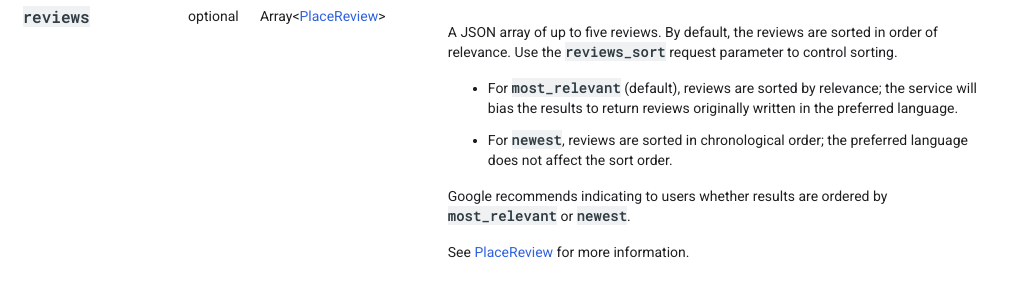
Source: Google Places API documentation
Pulling at both centre and stall level helps — 14,497 reviews is a lot better than 545 — but the sample is still narrow. Direct scraping would give me more, and that’s probably the next thing to try.
The base dataset is a snapshot. Centres are seeded from a GeoJSON at build time, so openings, closures, and renames only show up when I re-seed. That’s acceptable for a side project, but not for anything anyone would depend on.
Things I learned along the way
On AI products, the hard part is usually not the model. What mattered more here was whether the product understood what the user meant, had the right information to work with, and returned something people could judge for themselves.
AI makes it faster to build, but not easier to decide. It helped compress a lot of the setup and implementation work, but the real decisions were still product decisions: what to show, what not to show, and what would make a recommendation feel genuinely useful.
Trust comes from limits. The feature got better when I made it narrower and more explainable. In a product like this, reliability matters more than trying to make the AI feel magical.
Closing thoughts
I went into this thinking I was building a food discovery app, and I came out thinking about public data. A weekend project that maps 122 hawker centres, tags them by their nearest MRT, and semantically searches 14,497 reviews is only possible because someone at data.gov.sg and LTA decided to publish their datasets cleanly. That work, done once, let me (and anyone else) build on top of it without permission and without cost.
I think that’s the most interesting story here — not the AI layer, not the map, but the fact that open data shifts the bottleneck from access to imagination. The harder question becomes which problems are worth picking up. That feels like a reasonable place for the ceiling to sit.
Try it: makan-map-sg.vercel.app
Tags:
-
Product
-
AI
-
Singapore
-
Public Goods
Written by

Michelle Louisa
Aspiring Product Manager
based in Singapore